System Architecture
BTick separates robot-level behavioral communication from client-side UI delivery through a unified bridge architecture.
System Overview
The bridge layer acts as a multiplexer and normalization engine, abstracting the differences between robot communication protocols so the graphical interface receives consistent data:
+---------------------------------------------------------------------------------------+
|                               Robot / Application                                     |
|                                                                                       |
|       BTick                               Nav2                       Groot2           |
|  btick::Monitor                     /behavior_tree_log           Groot2Publisher      |
+---------------------------------------------------------------------------------------+
            |                                 |                             |
      ROS 2 Topics                       ROS 2 Topic                  TCP / ZMQ
        (/btick/*)                   (/behavior_tree_log)             (1667 / 1668)
            |                                 |                             |
            +---------------------------------+-----------------------------+
                                              |
+---------------------------------------------------------------------------------------+
|                         BTick Unified Multi-Protocol Bridge                           |
|                                                                                       |
|       btick_bridge.py              nav2_bridge.py             groot2_bridge.py        |
+---------------------------------------------------------------------------------------+
                                              |
                      +------------------------+------------------------+
                      |                                                 |
            Web Application Path                              Desktop Application Path
                      |                                                 |
            +----------------------+                         +----------------------+
            | WebSocket Server     |                         | Electron Desktop     |
            | Port 8080            |                         | Application          |
            |                      |                         |                      |
            | HTTP Server          |                         | React + ReactFlow    |
            | Port 3000            |                         |                      |
            +----------------------+                         +----------------------+
                      |                                                 |
            +----------------------+                         +----------------------+
            | Browser              |                         | Native Linux .deb    |
            | React + ReactFlow    |                         |                      |
            | localhost:3000       |                         |                      |
            +----------------------+                         +----------------------+
Components
Component |
Implementation / Location |
Responsibilities |
|---|---|---|
C++ Client Library |
|
Instruments BehaviorTree.CPP v4 applications via |
Unified Bridge Server |
|
Coordinates protocol bridges, normalizes tree telemetry into a unified WebSocket stream (port 8080), routes client commands, and serves the web application over HTTP (port 3000). |
BTick Bridge |
|
Connects to the C++ client over ROS 2 topics, streaming live tree discovery and transition events while forwarding interactive debugging commands to instrumented trees. |
Nav2 Bridge |
|
Provides passive, read-only monitoring by subscribing to Nav2’s native |
Groot2 ZMQ Bridge |
|
Connects to BehaviorTree.CPP’s |
Visualizer & Editor |
|
Web and desktop frontend providing real-time tree canvas visualization, interactive execution controls where supported, visual XML tree editing, and session recording and replay. |
Robot Communication Protocols
BTick
Integrates BehaviorTree.CPP applications with BTick through ROS 2 topics. It publishes tree discovery and transition telemetry and runs an auxiliary node (
btick_cmd_<NodeName>_<TreeId>) on a dedicated executor. It supports interactive debugging commands, including breakpoint-based pausing, stepping, forced status, delay injection, Blackboard writes, and live port editing. Commands are routed bytree_id.Nav2
Passively monitors Nav2 through the
/behavior_tree_logtopic usingnav2_msgs/msg/BehaviorTreeLog. The bridge matches log events against user-loaded XML trees and normalizes node statuses. It is read-only and does not provide command execution or Blackboard telemetry.Groot2
Connects to
BT::Groot2Publisherthrough ZMQ REQ and SUB sockets, using default ports1667and1668, respectively. It supports tree and status retrieval, read-only Blackboard inspection, supported debugging controls, and transition monitoring. Blackboard writes, port editing, and delay injection are not supported.
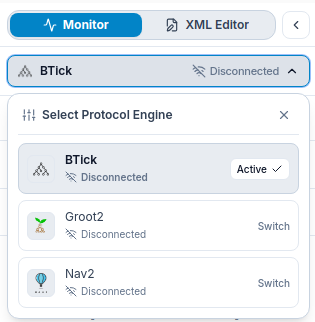
For a detailed side-by-side comparison of protocol capabilities, see Protocol Comparison.
Internal Web Transports
The bridge communicates with the frontend using two internal web transports:
WebSocket Server (Default Port: 8080): Implemented in
bridge/common.py(pure-Python RFC 6455 implementation). Streams standardized JSON state events to connected clients and handles UI commands. Configurable via the--ws-portCLI flag or theWS_PORTenvironment variable.HTTP SPA Server (Default Port: 3000): Serves compiled React frontend static files. Configurable via the
--http-portCLI flag or theHTTP_PORTenvironment variable. The static asset distribution directory is configured via the--dist-dirCLI option (defaulting to the localdist/directory if present).
Groot2 Connection Settings
The Groot2 bridge connects to BehaviorTree.CPP’s BT::Groot2Publisher via ZMQ REQ and SUB sockets:
Target Host: Configurable via
--zmq-host(environment:ZMQ_HOST, default:127.0.0.1). In standalonegroot2_bridge.py, configured via--host.REQ Socket Port: Configurable via
--zmq-port(environment:ZMQ_PORT, default:1667). In standalonegroot2_bridge.py, configured via--port.SUB Socket Port: Derived automatically as
port + 1(default:1668) and connects to the same target host to subscribe to transitions and breakpoint notifications.
Common Event Model
The bridge normalizes protocol data into JSON events and broadcasts them to frontend clients over WebSocket. Available events depend on the connected protocol.
tree_created / tree: Publishes behavior tree topology and node definitions.
transition: Reports node status transitions and associated metadata.
protocol_heartbeat / status: Reports protocol connection and runtime status.
execution_cycle_started: Signals the start of a root-node execution cycle (BTick and Groot2).
tree_status: Resets tree state when a connection is lost or a stream times out (Nav2 and Groot2).
execution_resumed: Signals resumed execution after a breakpoint is unlocked (Groot2).
blackboard_update: Publishes Blackboard snapshots (Groot2).
blackboard_update_response: Reports the result of a Blackboard write command (BTick).
set_node_port_response: Reports the result of a node-port edit command (BTick).
Event payloads and available debugging features vary by protocol. Nav2 is read-only; it does not provide standalone Blackboard updates or live node-port editing.
Connection States
Each protocol adapter tracks and broadcasts protocol liveness via heartbeat messages containing one of three standardized states:
CONNECTED_RUNNING: The bridge is connected to the robot source and actively observing execution.
CONNECTED_IDLE: The bridge is connected to the source, but the tree is currently idle or waiting for goals.
DISCONNECTED: The source is unreachable or not publishing data.